ProjectIQ
Project management on Microsoft Dataverse
What was planned, what has been spent, what is still committed.
From the offer to the closing of the job: WBS and budget, Gantt with critical path and baselines, timesheets, materials, purchasing and a supplier portal, in one Power Apps model-driven app on Microsoft Dataverse.
Open source under the Apache License 2.0. Requires Power Apps Premium for internal users.
 ProjectIQ · Project · PRJ-000124 Rooftop solar plant 450 kWp · Gantt
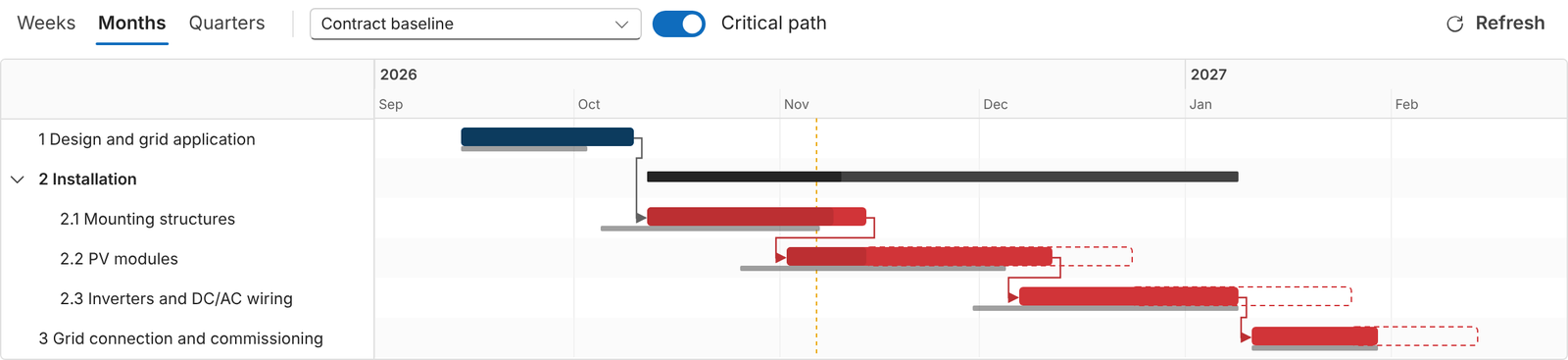
The Gantt chart of ProjectIQ, with critical path and baseline. Demo data.
PlanningWBS, Gantt, critical path, baselines
Time trackingWeekly timesheet, approval, reminders
PurchasingRequests, RFQs, orders, receipts, invoices
Costs and marginActual, committed, estimate at completion
The problem
The job is spread across tools. The numbers should not be.
One shared plan.
Budget, WBS, plan, hours and purchases live in the project, not in separate spreadsheets and e-mails.
Hours valued on the day they were worked.
Approved hours become actual cost of the WBS, valued at the hourly cost valid on the day.
Committed cost before the invoice.
Open purchase orders show the committed cost, so the loss of margin is visible before the job closes.
Features
From the offer to the closing of the job
Every area of ProjectIQ, each with its user manual in English, Italian, French and German.
Projects and team
The project is the heart of ProjectIQ: customer, project manager, dates, contract value, budget, actual and committed cost, progress. Each member has a project role.
Screenshot coming soonProject form
Read the manual →
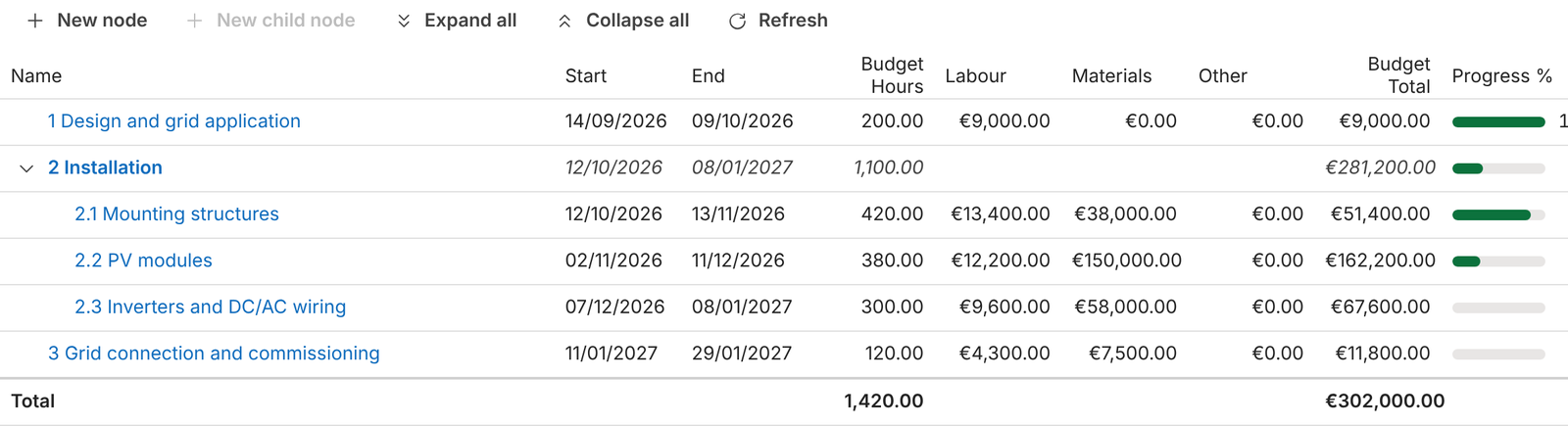
WBS, budget, Gantt and baselines
Phases, work packages and tasks with budget, a Gantt chart with dependencies and critical path, and baselines to compare the plan with what is happening.
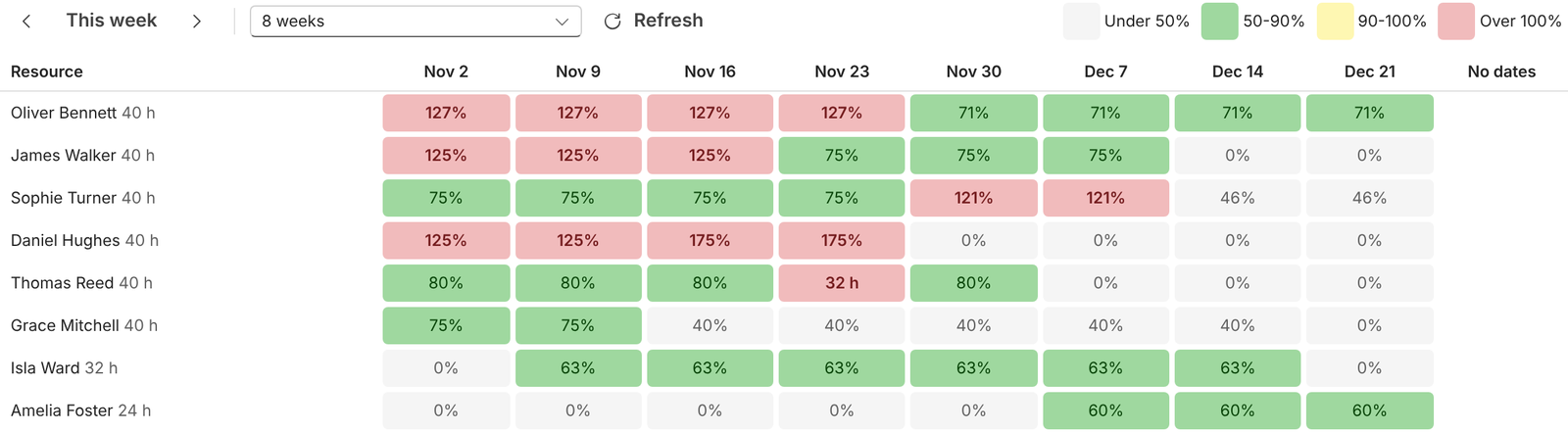
Resource load
Allocate hours of resources on WBS nodes and read the heat map that compares, week by week, allocated hours with each person's capacity.
Time tracking
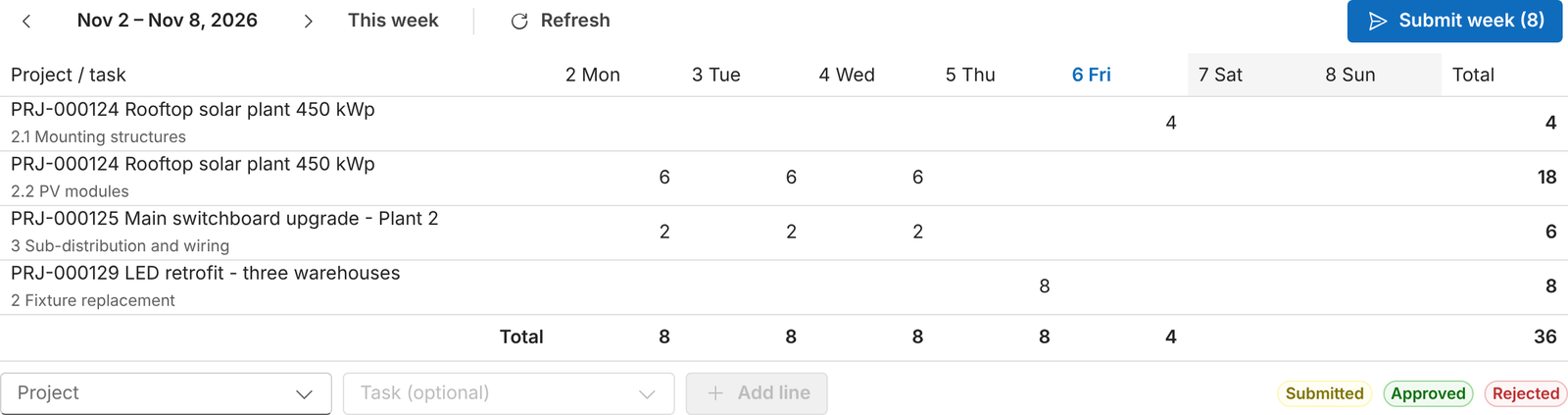
Weekly timesheet by project and task, approval or rejection by the project managers, and a daily reminder for people who forgot their hours.
Materials and costs
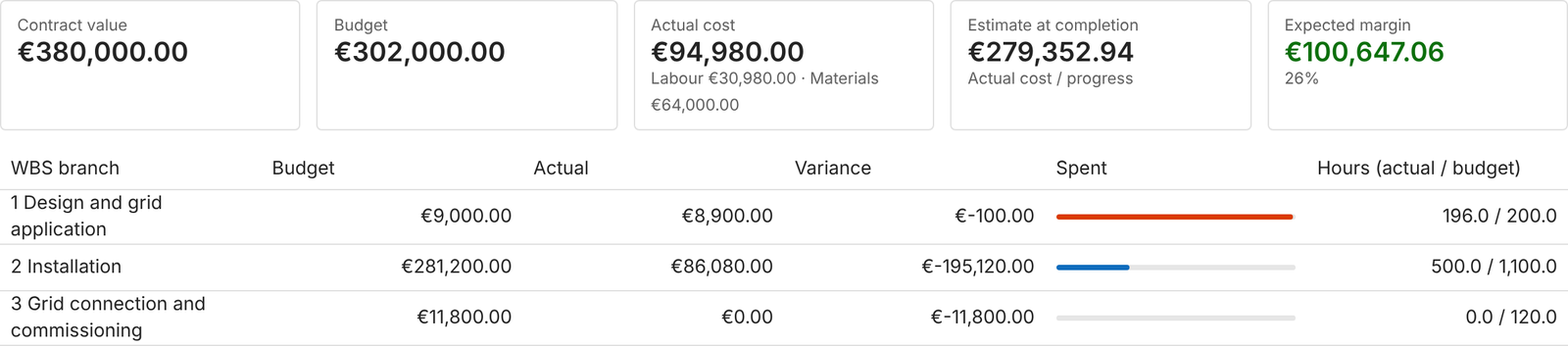
Material usage, actual cost from approved hours and materials, committed cost of open orders, and a cost summary with estimate at completion and margin.
Purchasing
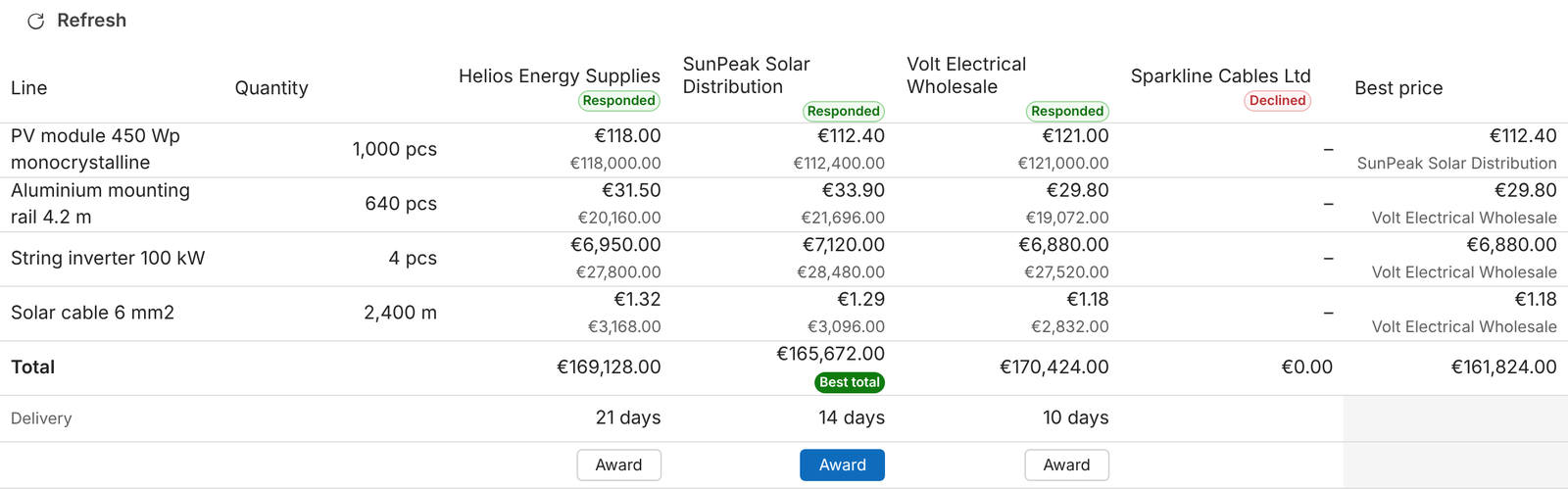
Requests with budget check, approval, RFQs with quote comparison, purchase orders, goods receipts and supplier invoices.
Supplier portal
A Power Pages site where suppliers quote RFQs, confirm orders and keep their documents up to date.
Screenshot coming soonSupplier portal dashboard
Read the manual →
Documents in SharePoint
Each project, purchase order and supplier document gets its own SharePoint folder, opened from the record.
Screenshot coming soonDocuments tab of a project
Read the manual →
Master data
Customers, suppliers, contacts, items and resources: the records costs, purchasing and planning rely on.
Screenshot coming soonMaster Data area
Read the manual →
Administration
Users, security roles, cost visibility, company settings and the background automations.
Screenshot coming soonSettings area
Read the manual →
Copilot and Cowork
Questions in natural language on ProjectIQ data, read-only, with the same permissions as the app.
Screenshot coming soonCopilot pane in the app
Read the manual →
Portfolio Agent
ProjectIQ cards in Microsoft 365 Copilot: portfolio KPIs, hours logged and approved, draft projects from documents.
Screenshot coming soonPortfolio Agent card in Copilot
Read the manual →
AI in daily work
Ask your project data
Copilot and Cowork answer questions in natural language, read-only, with the same security as the app. The Portfolio Agent brings ProjectIQ cards into Microsoft 365 Copilot.
Copilot Chat“How is project PRJ-000123 going?”An answer built from the same records you see in the app.
Project manager“Which hours do I have to approve?”Read-only: every action stays on the buttons of the app.
Portfolio Agent“Create a draft project from this document”A draft to complete; nothing is created before Confirm.
AI can make mistakes. Check the answers; Copilot reads only the data your role can already see.
Explore Copilot →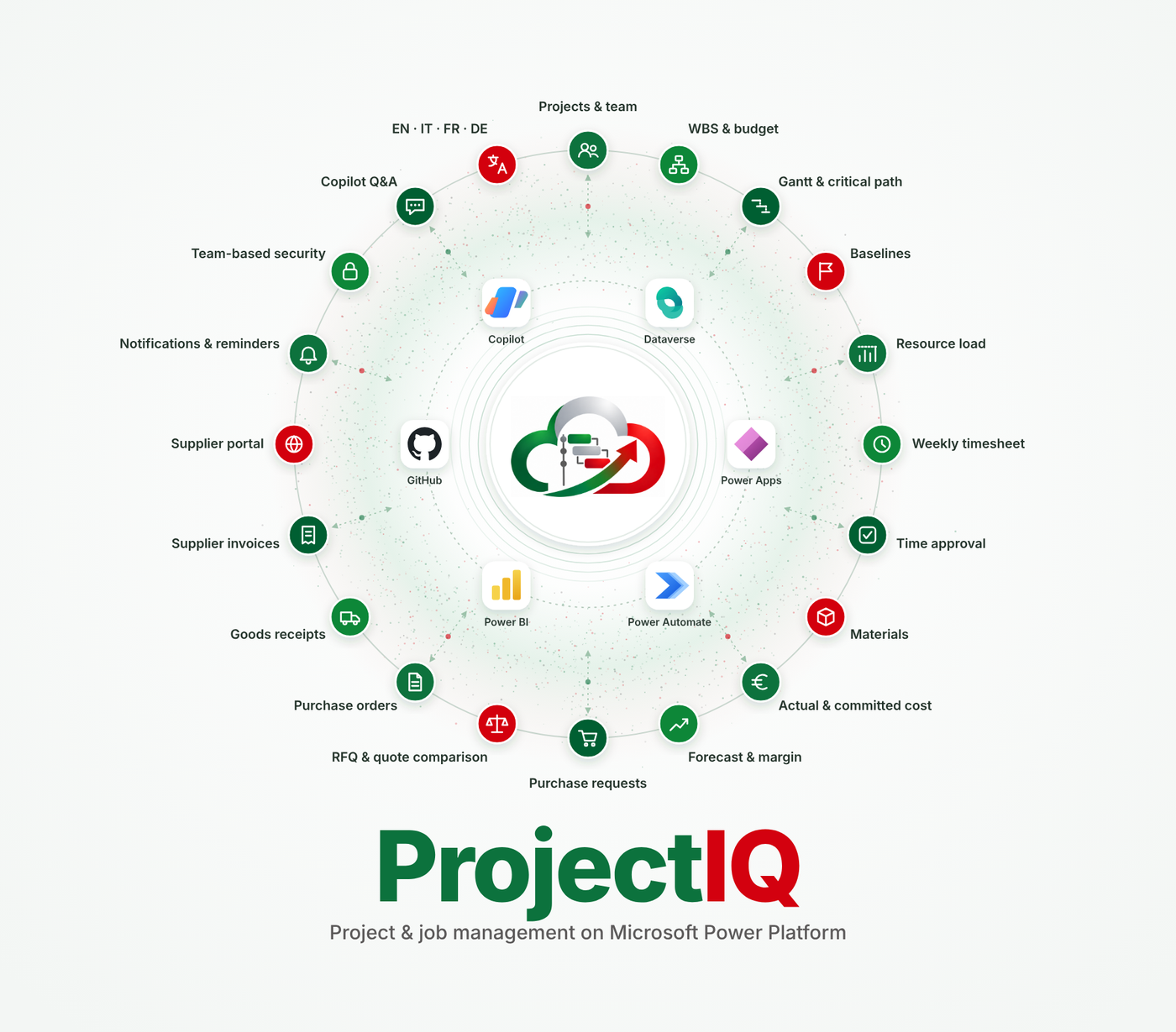
User manuals
Read the manuals in your language
Technical documentation
Build, deploy and extend ProjectIQ
Setup
Development environment
Tools, environments and deployment of the solution, plugins and PCF controls.
SchemaData model
Tables, relationships and choices of the Dataverse solution, with diagrams.
ReleasePublishing on Microsoft AppSource
Package Deployer project, listing assets and the release workflow.
Frequently asked questions
Which licences do I need?
Power Apps Premium for internal users. Suppliers use the Power Pages portal.
Where are my data stored?
In your company's own Dataverse environment: one database per company, nothing shared with other customers.
Can team members see costs and margins?
Only users with the OP365 Cost Visibility column security profile see hourly costs and the other protected cost columns.
Can Copilot change data?
No. Copilot and Cowork are read-only and see only the data your role can already access. The Portfolio Agent logs hours or creates a draft project only after you confirm.
Which languages are available?
The app and the manuals are in English, Italian, French and German.
Is it open source?
Yes, under the Apache License 2.0. The source is on GitHub.